Digging deeper into OAuth
There are so many web applications in today’s world. Most of the applications require to create an account in order to use it. Creating an account seems to be a huge process where we have to fill up a lengthy form and provide a unique username. Also, we need to remember the credentials whenever we need to log in. So, how can we overcome these difficulties? With the use of OAuth, we can use social media login to sign up or sign in to an account.

What is OAuth?
It is a framework for delegated authorization. It allows third-party applications to access protected user resources on behalf of the user. OAuth works over HTTPS and authorizes devices, APIs, servers, and applications with access tokens rather than credentials. There are two versions of OAuth: OAuth 1.0a and OAuth 2.0. The most widely used form of OAuth is OAuth 2.0.

The main components of OAuth are as follows
- Roles
- OAuth tokens
- OAuth endpoints
- OAuth grant types
Roles
There are four roles defined in OAuth. They are
- Resource server: The server which stores data the application wants to access
- Resource owner: Owns the data in the resource server and grants access to a protected resource. eg: Resource Owner of my Facebook profile.
- Client: The application that wants to access your data
- Authorization server: The server which issues access tokens to the client after authenticating the resource owner and obtaining authorization
OAuth tokens
- Access tokens
Access tokens are the token the client uses to access the Resource Server (API). They are meant to be short-lived. These tokens represent specific scopes and durations of access, granted by the resource owner, and enforced by the resource server and authorization server.
- Refresh tokens
Refresh token is used to get new access tokens when the current access token becomes invalid or expires. It is issued to the client by the authorization server. Unlike access tokens, refresh tokens are intended for use only with authorization servers and are never sent to resource servers.
OAuth endpoints
There are server endpoints and client endpoints. The two server endpoints are authorize endpoint and token endpoint. The client endpoint is the redirection endpoint.
- Authorize endpoint
The authorize endpoint is where you go to get consent and authorization from the user. This returns an authorization grant that says the user has consented to it. The authorization server must first verify the identity of the resource owner.
- Token endpoint
It is used by the client to exchange an authorization grant for an access token, typically with client authentication. The token endpoint processes the grant and provides access and refresh tokens.
- Redirection endpoint
It is used by the authorization server to send responses including authorization credentials to the client

OAuth grant type
There are four main grant types in OAuth.
- Authorization Code
The Authorization Code grant type is used by confidential and public clients to exchange an authorization code for an access token. After the user returns to the client via the redirect URL, the application will get the authorization code from the URL and use it to request an access token. This request will be made to the token endpoint.
The authorization request will contain the following parameters.
- response_type - a required parameter and the value must be "code"
- client_id - a required parameter
- redirect_uri - optional
- scope - optional, the scope of the access request
- state - used to prevent CSRF
If the request is accepted by the resource owner, the authorization server provides authorization code and delivers it to the client by adding the following parameters to the query component of the redirection URI.
- code - the authorization code sent by the authorization server
- state
The flow of the authorization code is explained in the below image

- Implicit
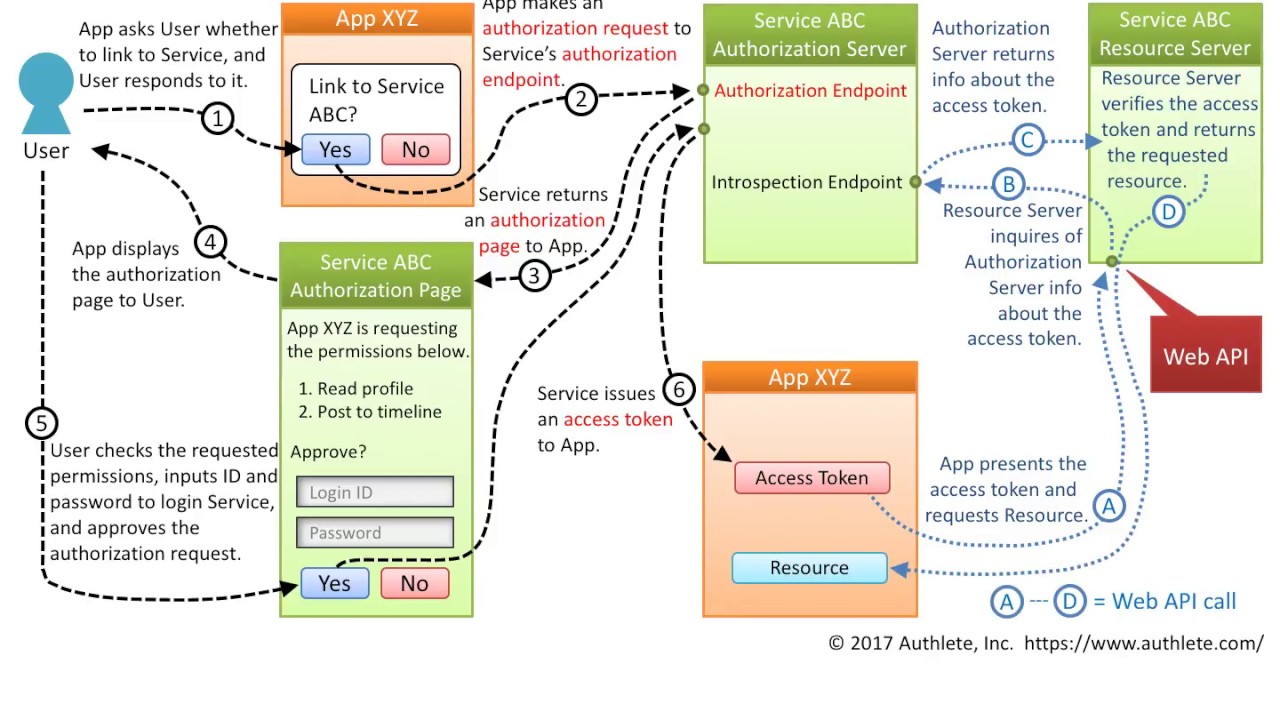
In the implicit flow, all the communication happens through the browser. There is no backend server redeeming the authorization grant for an access token. Unlike the authorization code grant type, in which the client makes separate requests for authorization and for an access token, the client receives the access token as the result of the authorization request. The authorization request is similar to the Authentication code grant type except for the value of the following parameter.
- response_type - a required parameter and the value must be "token"
The implicit flow is explained in the below image
- Client Credentials
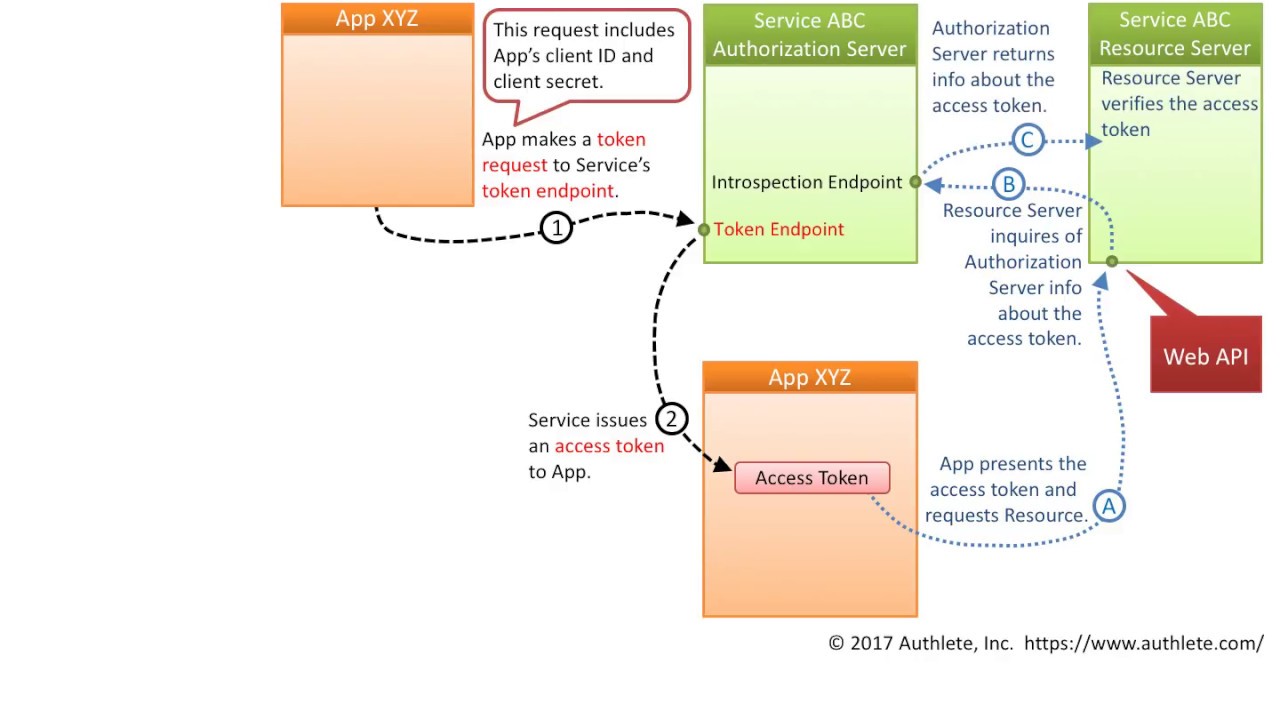
For server-to-server scenarios, Client Credential Flow is used. In this scenario, the client application is a confidential client that’s acting on its own, not on behalf of the user. It’s more of a service account type of scenario. All you need is the client’s credentials to do the whole flow. It supports shared secrets or assertions as client credentials signed with either symmetric or asymmetric keys.
Since the client authentication is used as the authorization grant, no additional authorization request is needed.
The client credentials flow is explained in the below image.
- Resource Owner Password Credentials
In this flow, you send the client application a username and password and it returns an access token from the Authorization Server. It typically does not support refresh tokens and it assumes the Resource Owner and Public Client are on the same device.
The resource owner password credentials flow is discussed below
 So, I hope the basic knowledge of OAuth has been provided in this blog. Refer my next blog to create a sample application using OAuth in Java. :)
- Resource Owner Password Credentials
In this flow, you send the client application a username and password and it returns an access token from the Authorization Server. It typically does not support refresh tokens and it assumes the Resource Owner and Public Client are on the same device.
The resource owner password credentials flow is discussed below
So, I hope the basic knowledge of OAuth has been provided in this blog. Refer my next blog to create a sample application using OAuth in Java. :)


Comments
Post a Comment